


Survival maps for Minecraft PE
4.399.00 Reviews
App Specs
- Version
- 1.4.9
- Updated On
- License
- Free
- Downloads
- 5,000,000+
- Developer
- AndiQwer
- Categories
- Events
- Platform
- Android, iOS
Screenshots
 Analysis by AppCompare
I like the idea behind Survival Maps for Minecraft PE: instead of starting with another open-ended Minecraft world, I can use a map built around a particular survival challenge. That small change makes it easier to decide what to play when I have a short session or want a different kind of start. This is an events app from AndiQwer, and its focus is squarely on finding survival maps for Minecraft PE rather than replacing Minecraft itself.
Why a one-tap map library changes the routine
The useful part is the short path from choosing a map to trying a new setup. When I already know I want a survival challenge, browsing a collection is more direct than searching the web, opening separate pages, and figuring out which download belongs with which world. The app is free to install, though it offers in-app purchases, so I would check the purchase details before deciding whether any paid option is worthwhile.
That convenience matters most when I want to spend my time playing rather than sorting files. A map gives the next session a clear premise: limited space, a particular landscape, or a route that calls for careful exploration. I still need Minecraft PE to play, so I treat this app as a map-finding and installation companion, not as a standalone game.
Choosing a map with the session in mind
My practical tip is to pick based on the time and mood I actually have. A compact survival setup can suit a brief evening session, while a map that depends on exploring unfamiliar terrain is a better fit when I can settle in. If I am playing with a friend, I would agree on the kind of challenge first; choosing a map together helps avoid loading something that one person finds tedious or too demanding.
I would also pause before installing a map and read its description carefully. The name or artwork alone may not tell me what the starting conditions or objectives are. That quick check can save the annoyance of entering a world expecting a relaxed survival run and discovering that its central appeal is a demanding puzzle or combat challenge. Since the maps are intended for Minecraft PE, I would confirm my copy of Minecraft is ready to open the downloaded content before I start browsing for a particular session.
Where it fits among the alternatives
Compared with looking for maps through general web searches, a dedicated catalog can make discovery feel less scattered. It keeps the task focused on survival maps, which is helpful if I do not want to sift through unrelated Minecraft material. The trade-off is that a catalog is only as useful as the selection and descriptions it presents; if I need a very specific theme or want to inspect a creator’s instructions in depth, a broader search may still be the better route.
I would not use this as a substitute for Minecraft’s own world creation when I want to shape every setting myself. A ready-made map is appealing because someone has already framed the challenge, but that also means I am accepting the creator’s layout and starting point. Players who enjoy designing their own terrain or controlling every detail may get more satisfaction from building a world directly in Minecraft.
Worth Reading Before You Choose

Baby Panda World Brings Quick Play to Modern Phones, but Its Game Library Feels Busy

ESPN’s Live Game View Makes Following Close Games Easier

QuizzLand Review: A Good Fit for Short Trivia Breaks, Not Every Player

Basketball Stars: Multiplayer Is Fast, but Can It Recover When Matches Go Wrong?

WEBTOON Turns Phone Updates Into a Better Reading Routine

Link to Windows Runs on Shared Habits, Not Social Feeds
The app has a 4.3 average from around 17,000 ratings and has passed five million installs, which suggests it has found an audience among Minecraft PE players. Those figures are useful context, not a guarantee that every map will suit my taste. It is rated Teen, and Minecraft experience still matters: a map designed around survival decisions may be frustrating for someone who has not learned the basics of gathering, crafting, and staying safe.
Getting Started with Survival Maps
First things first, let’s talk about getting this app up and running. Installation is a breeze, and within minutes, I was ready to dive into a variety of survival maps that promised to test my skills and creativity. If you're familiar with Minecraft PE, you'll feel right at home. The interface is intuitive, and I was able to navigate through the options without a hitch.
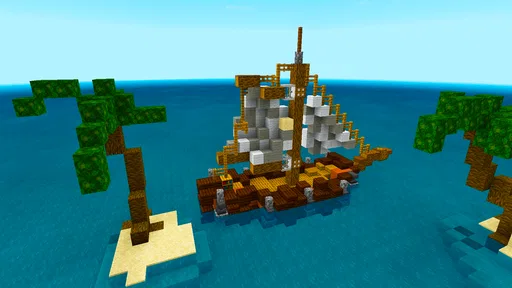
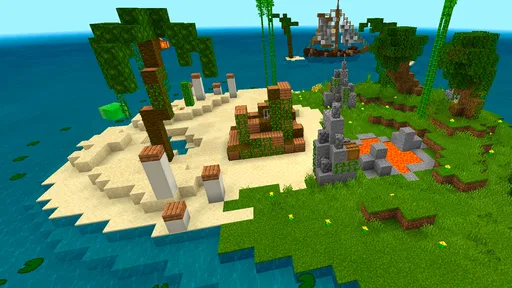
Once installed, I was greeted with a plethora of maps, each with its unique flair. From deserted islands to dense forests, the options are vast and exciting. Each map comes with its own set of challenges, ensuring that no two experiences are the same.
Exploring the Features
What I found particularly appealing about Survival Maps for Minecraft PE is the diversity it offers. It’s not just about surviving; it’s about thriving in different environments. Some maps require you to gather resources strategically, while others push your combat skills to the limit. It’s a mixed bag of excitement and strategy.
One of the standout features has to be the community-driven content. Players can create and share their own maps, adding a layer of endless possibilities. I stumbled across some user-generated maps that were mind-blowingly creative. It’s fascinating to see the different ways players interpret survival scenarios.
The Thrill of Survival
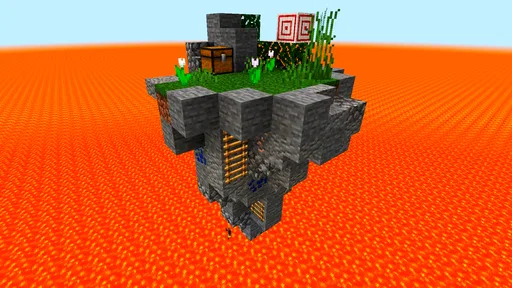
Now, onto the real deal—the actual survival experience. I started with a map that placed me on a tiny island with limited resources. My goal? Survive as long as possible while expanding my territory. Easy, right? Not quite. The limited resources meant I had to think several steps ahead, prioritizing what to craft and when. It was intense, but incredibly rewarding.
Another map I tried had me navigating through a labyrinth filled with traps and monsters. Talk about an adrenaline rush! It was all about quick thinking and faster reflexes. The variety of challenges kept me on my toes and made each session feel fresh and exciting.
For an ordinary evening, I would use the app when I am tired of loading the same familiar world but do not want to spend the whole session planning a new one. I can browse for a survival premise, choose a map that matches my mood, and keep the play session centered on its constraints. If I have only a little time, I would avoid a map that sounds like it depends on a long exploration; if I have a free evening, a more involved challenge gives me room to learn the layout and adapt. That is a simple way to make the choice feel intentional rather than downloading the first appealing thumbnail.
There is a small but worthwhile workflow distinction here: discovering a map and enjoying it are separate steps. I would select a candidate, read what the map is meant to test, then install it when I am ready to play rather than collecting several worlds I may never open. This keeps my choices manageable and makes it easier to remember why I picked a particular setup. If something does not suit me, I can move on to another premise instead of assuming every survival map is meant to play the same way.
Make the installation part of the decision
The one-click idea is convenient, but I would still treat each installation as a choice rather than an automatic tap. A map only helps if it opens properly in the Minecraft PE setup I use and gives me the sort of session I want. I would check that Minecraft is installed and ready first, then follow the app’s map flow and allow time to confirm the world appears where I expect it. If a handoff does not go as planned, repeating the tap without checking the selected map or the game’s availability is unlikely to make the process clearer.
For anyone wondering whether the app itself is the game, the distinction is important: it is a utility for getting survival maps, while the actual play happens in Minecraft PE. That makes it most useful to players who already use the mobile edition and want curated starting points. Someone looking for a new standalone survival game should skip it, and a player who does not have Minecraft PE should not expect this app alone to provide a playable world.
I would also be selective about what I keep. A map is not automatically a good fit just because it is available, and the challenge can depend heavily on its layout and instructions. If the goal is a fair survival run, I would give myself a moment to understand the setup before committing to a long session. For a casual player, that little bit of preparation can prevent a confusing opening from being mistaken for a poor map.
What the collection cannot decide for you
Compared with building a world from scratch, a ready-made map saves setup time but narrows my control. That is a fair trade when I want someone else’s challenge, and a poor one when I want to choose every condition myself. Compared with finding individual downloads through broad searches, a focused catalog is easier to browse for this particular purpose, but it may not answer every question I have about a creator’s design. I would use a general search when I need extensive background or a very particular map, and this app when I want to browse survival choices without turning the search itself into the evening’s main activity.
Another sensible habit is to think about how I want to judge a map before starting. On a resource-limited island, I might treat careful planning as the point; in a maze-like setup, I would expect exploration and quick decisions to matter more. If I play with others, agreeing on whether we want a relaxed run or a demanding one avoids a mismatch. These are not extra app features; they are ways to make the map selection work better for the people using it.
The app is free, and the listed in-app purchases range from $3.99 to $4.99 per item. I would browse the available choices before paying and decide whether the free experience already gives me enough variety. Its current version is 1.4.9 and it requires Android 6.0 or later. I would check those basics before downloading, especially if I am setting it up on an older device. The app’s Teen rating is another useful consideration for families deciding whether it is suitable for a younger player.
Who will get the most from it
I think the strongest match is a Minecraft PE player who enjoys survival but sometimes wants a fresh constraint without designing a world personally. Newer players can use a clearly themed map to focus on one kind of decision at a time, while experienced players may enjoy seeing how a different layout changes their usual habits. It is also a practical choice for someone sharing play ideas with a friend: choosing the same premise gives both people a common challenge to discuss, even if they approach it differently.
On the other hand, I would pass if I mainly play creative mode, want a full game rather than a map companion, or prefer complete control over world generation. I would also be cautious if I dislike trial and error; survival maps can make scarcity, navigation, or combat the point, and that may feel like friction rather than fun. The app is most rewarding when I am willing to accept a creator’s starting conditions and make the best of them.
Why It’s Worth Your Time
If you’re on the hunt for a game that combines creativity with strategic survival, this app is a must-try. The replayability factor is off the charts, thanks to the endless map options and community contributions.
The app also runs smoothly on various devices, which means you can enjoy these thrilling maps without worrying about performance issues. Plus, the regular updates ensure that there’s always something new to explore.
Overall, Survival Maps for Minecraft PE offers a unique twist to the classic Minecraft experience. Whether you’re a seasoned player or new to the game, there’s something here for everyone to enjoy. So, grab your pickaxe and dive into the adventure!
Pros
- Diverse map selection for all play styles.
- Easy installation with step-by-step guidance.
- Regular updates with new challenges.
- Compatible with most Minecraft PE versions.
- Engaging multiplayer maps for friends.
Cons
- Requires stable internet for downloads.
- Some maps have complex setups.
- Limited support for older devices.
- Occasional bugs in custom maps.
- Ads can be intrusive at times.
FAQs for Survival maps for Minecraft PE
What are Survival Maps for Minecraft PE?
Survival Maps for Minecraft PE are custom-designed worlds that challenge players to survive with limited resources. These maps often include unique terrains, hidden treasures, and specific objectives. They provide a fresh twist on traditional gameplay, encouraging players to strategize and explore new environments while honing their survival skills.
How do I install a Survival Map on Minecraft PE?
To install a Survival Map on Minecraft PE, download the map file, usually in a .mcworld or .zip format. Access your device’s file manager, locate the downloaded file, and open it with Minecraft PE. The map should automatically import into your game, ready for you to explore and survive.
Are Survival Maps for Minecraft PE free to download?
Many Survival Maps for Minecraft PE are available for free, though some creators may charge a fee. Always download maps from reputable sources to ensure security and quality. Check the app or website for any associated costs before proceeding with a download to avoid unexpected charges.
Can I play Survival Maps for Minecraft PE offline?
Yes, you can play Survival Maps for Minecraft PE offline. Once the map has been downloaded and installed on your device, you don't need an internet connection to access it. This allows for uninterrupted gameplay, making it ideal for situations where connectivity is limited.
Do Survival Maps affect the performance of Minecraft PE?
Survival Maps can affect performance based on their complexity and your device’s capabilities. Maps with extensive details or large areas may cause lag on older devices. It’s advisable to check map reviews or descriptions for performance notes to ensure smooth gameplay on your specific device.


